Disney Cursors
This Disney cursor set is a single fan-made pack for now, made for fairy-tale fans and not tied to one heroine.
1 Disney cursor pack
All Movies & TV cursors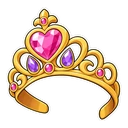
Hover a card to preview the cursor, then press “Use this pack” to add it.
About the Disney cursor collection
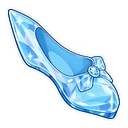
This Disney cursor set is a single fan-made pack for now, made for fairy-tale fans and not tied to one heroine. Disney Princess uses a princess tiara as the normal cursor, and a glass slipper appears when you hover a link or button. Both are drawn as chibi stickers with bold outlines. No character is shown, so it suits a fan of any princess, and it is free to apply.
A tiara and a glass slipper, with no princess named
The pack sticks to two objects on purpose. A tiara could belong to any princess from Aurora to Tiana, so nobody's favourite is left out. The glass slipper will remind most people of Cinderella, who loses hers on the palace steps at midnight, but no face is drawn. That keeps the cursor simple for young children and easy to share on a family computer, where one child wants Ariel and another wants Moana.
What the Disney set does not include yet
One pack cannot cover a studio that runs from Mickey Mouse to Frozen, and it does not try. There is no Mickey, Stitch, Elsa or Simba here at present. Encanto has its own collection on the site, and so do Marvel and Star Wars. If you want a particular character today, the builder lets you upload an image of your own and use it as your cursor, with the same size slider.
Which Disney pack to pick
With one pack there is no choosing between designs, only how to set it. For a young child, slide the size up so the tiara is easy to follow. For yourself, a medium size keeps it neat beside text. It suits anyone planning a park trip, running a princess-themed birthday or matching a browser to a pastel wallpaper.
The Disney pack
Each pack is a matched pair: one image for your normal pointer and one that takes over when you hover a link or button.
- Disney Princess and Glass Slipper Cursor: a princess tiara for the pointer, a glass slipper on hover.
How to add a Disney cursor to Chrome
Add Cursor Customiser, the free custom cursor extension, from the Chrome Web Store, then press “Use this pack” on any pack above. It applies straight away.
Related guide: Build your own cursor from an image. You can also add a cursor trail or make your own pair.
Where Disney cursors work
It shows on web pages in Chrome: Disney+ in a browser tab, the Disney Wiki on Fandom, the Disney parks and store sites, YouTube and colouring pages. It does not show in the Disney+ app on a TV, phone or tablet, in Disney Dreamlight Valley or any other game, or outside the browser.
Frequently asked questions
Which princess is this pack based on?
None in particular. The tiara is a generic princess crown, and the glass slipper will remind most people of Cinderella, but no character is drawn. That is deliberate, so it suits a fan of any princess.
Are Mickey, Stitch or Frozen cursors included?
Not in this collection at present. Encanto has its own collection on the site, and for Mickey, Stitch, Elsa or anyone else you can upload your own image in the builder.
Is the Disney Princess cursor easy for a young child to use?
Yes, once you raise the size. The pack is two simple objects with bold outlines, and a larger setting on the slider in the popup makes the tiara easy to follow across the page.
Are these official Disney cursors?
No. They are fan-made and unofficial. Cursor Customiser is not affiliated with or endorsed by Disney. They are free, with no ads inside the extension and no account.
Fan-made and unofficial. Cursor Customiser is not affiliated with, endorsed by or sponsored by Disney. All names and characters belong to their respective owners. Rights holder with a concern? See copyright and takedown requests.