Genshin Impact Cursors
Six fan-made Genshin Impact cursor packs for Chrome: four characters, a Primogem and a pair of slimes.
6 Genshin Impact cursor packs
All Gaming cursors










Hover a card to preview the cursor, then press “Use this pack” to add it.
About the Genshin Impact cursor collection
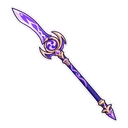
Six fan-made Genshin Impact cursor packs for Chrome: four characters, a Primogem and a pair of slimes. Paimon floats with her halo crown and swaps to a Primogem. Hu Tao wears her porkpie hat and has a little ghost on hover. Raiden Shogun comes with the Engulfing Lightning polearm, and Venti holds his lyre beside a Windwheel Aster. Genshin Primogem turns into an Intertwined Fate, and Genshin Slime is a Hydro Slime with a tiny Dendro Slime on hover.
A guide, a funeral director, an Archon and a bard
The four characters come from across Teyvat. Paimon is the companion who talks you through the whole journey. Hu Tao runs the Wangsheng Funeral Parlor in Liyue, and her ghost is the spirit that keeps her company in the game. The Raiden Shogun is the Electro Archon of Inazuma, shown with Engulfing Lightning, her signature polearm. Venti is the bard of Mondstadt, and the Windwheel Aster is the pinwheel-shaped flower found around the city. Each hover image is something a player would link to that character on sight.
Genshin Impact cursor packs for wish counters and dark-mode wikis
Genshin Primogem is the pair for anyone counting pulls: the gem you save, then the wish you spend it on. With no character, it stays clear when the cursor is small. Genshin Slime changes from blue to green on hover, so the swap is easy to notice. Paimon is pale and mostly white, which makes her the pick for dark pages and a weak one on a white wiki. Raiden Shogun's long polearm is the sharpest hover shape in the set.
Which Genshin Impact pack to pick
Choose Raiden Shogun if you want the most precise hover pointer, or simply main the Electro Archon. Genshin Primogem holds up at small sizes. Paimon shows up on dark pages, where a pale figure has contrast. Hu Tao and Venti are cheerful character picks for fans of Liyue and Mondstadt. Genshin Slime is the round, extra-cute option, drawn kawaii with sparkly eyes and rosy cheeks.
All 6 Genshin Impact packs
Each pack is a matched pair: one image for your normal pointer and one that takes over when you hover a link or button.
- Hu Tao and Little Ghost Cursor: chibi Hu Tao in her porkpie hat for the pointer, a little ghost on hover.
- Venti and Windwheel Aster Cursor: chibi Venti with his lyre for the pointer, a Windwheel Aster on hover.
- Paimon and Primogem Cursor: chibi Paimon floating with her halo crown for the pointer, a Primogem on hover.
- Raiden Shogun and Engulfing Lightning Polearm Cursor: chibi Raiden Shogun for the pointer, the Engulfing Lightning polearm on hover.
- Genshin Primogem and Intertwined Fate Cursor: a sparkling Primogem for the pointer, an Intertwined Fate on hover.
- Genshin Slime and Tiny Dendro Slime Cursor: a bouncy Hydro Slime for the pointer, a tiny Dendro Slime on hover.
How to add a Genshin Impact cursor to Chrome
Add Cursor Customiser, the free custom cursor extension, from the Chrome Web Store, then press “Use this pack” on any pack above. It applies straight away.
Related guide: Make a cursor for your own main. You can also add a cursor trail or make your own pair.
Where Genshin Impact cursors work
These packs change your pointer in Chrome on HoYoLAB, the daily check-in page, the interactive map, the Genshin wiki, build guides and wish-tracking sites such as paimon.moe. They do not change the cursor in the Genshin Impact client or its launcher on PC, or on PlayStation, Xbox or mobile.
Frequently asked questions
Do these cursors work inside Genshin Impact?
No. The game and its launcher are separate programs. The cursors work in Chrome, which covers the web tools most players use beside the game: HoYoLAB, the interactive map and the wikis.
Is there a Genshin cursor for my main?
The character packs here are Paimon, Hu Tao, Raiden Shogun and Venti. For anyone else, open the builder and upload your own image for the pointer and the hover state.
Is there a Paimon cursor?
Yes. Paimon floats along with her halo crown as the normal pointer, and a Primogem appears when you hover a link. She is pale and mostly white, so she is easier to see on dark pages than on white ones.
Are these official Genshin Impact cursors?
No. They are fan-made and unofficial. Cursor Customiser is not affiliated with or endorsed by HoYoverse. They are free, with no ads inside the extension and no account.
Fan-made and unofficial. Cursor Customiser is not affiliated with, endorsed by or sponsored by HoYoverse. All names and characters belong to their respective owners. Rights holder with a concern? See copyright and takedown requests.