Zelda Cursors
Three fan-made Zelda cursor packs for Chrome: a princess, a Korok and a shield.
3 Zelda cursor packs
All Gaming cursors


Hover a card to preview the cursor, then press “Use this pack” to add it.
About the Zelda cursor collection
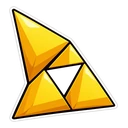
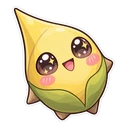
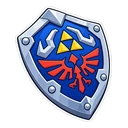
Three fan-made Zelda cursor packs for Chrome: a princess, a Korok and a shield. It is a small set. Princess Zelda appears in royal blue, with the Triforce as her hover pointer. Zelda Korok is a leafy Korok drawn in an extra-cute kawaii style, and it swaps to a Korok seed. Hylian Shield leaves characters out: the shield is the normal pointer and a Heart Container shows over links and buttons.
Triforce, Korok seed, Heart Container: three rewards on hover
Each hover image is something the games hand you for doing well. The Triforce is the golden relic at the centre of the series, and its triangles make a pointed shape that suits a pointer. A Korok seed is what you get for finding a hidden Korok, often under a suspicious rock. A Heart Container adds a heart to your health after a boss. So every link you reach gives a small prize, which fits a series built on finding things.
A Zelda cursor set without Link in it
There is no Link pack here. The nearest thing is Hylian Shield, the shield he carries through much of the series, and it is the practical choice: a compact shape that should read well small, with a red heart that is easy to spot on hover. Princess Zelda is the most detailed of the three, so use a larger size for her. If you want Link himself, the builder accepts your own images for the pointer and hover state.
Which Zelda pack to pick
Hylian Shield for everyday use and small cursor sizes. Princess Zelda if you want a character and do not mind turning the size up. Zelda Korok for anyone who cannot walk past a suspicious rock: it is the playful one, drawn with sparkly eyes. With only three packs, it is easy to try each for a day and keep the one you like.
All 3 Zelda packs
Each pack is a matched pair: one image for your normal pointer and one that takes over when you hover a link or button.
- Princess Zelda and Triforce Cursor: chibi Zelda in royal blue for the pointer, the Triforce on hover.
- Zelda Korok and Korok Seed Cursor: a leafy Korok saying “Yahaha!” for the pointer, a Korok seed on hover.
- Hylian Shield and Heart Container Cursor: the Hylian Shield for the pointer, a Heart Container on hover.
How to add a Zelda cursor to Chrome
Add Cursor Customiser, the free custom cursor extension, from the Chrome Web Store, then press “Use this pack” on any pack above. It applies straight away.
Related guide: How to change your cursor in Chrome. You can also add a cursor trail or make your own pair.
Where Zelda cursors work
You will see these cursors in Chrome on zelda.com, Zelda Wiki, Zelda Dungeon's interactive maps, speedrun.com and any other site. You will not see them inside a Zelda game on the Nintendo Switch or an older console, or in an emulator. A browser extension has no way to reach those.
Frequently asked questions
Is there a Link cursor in this collection?
Not as a character. The closest is the Hylian Shield pack, which uses the shield Link carries, with a Heart Container on hover. The character pack here is Princess Zelda herself.
Do Zelda cursors work on the Nintendo Switch?
No. The extension runs in Chrome on a computer and changes the pointer on websites. It cannot change anything on a console or inside a game.
Is there a Korok cursor?
Yes. Zelda Korok shows a leafy Korok in an extra-cute kawaii style with sparkly eyes, and the hover pointer is a Korok seed, the reward for finding one hidden in the world.
Are these official Zelda cursors?
No. They are fan-made and unofficial. Cursor Customiser is not affiliated with or endorsed by Nintendo. They are free, with no ads inside the extension and no account.
Fan-made and unofficial. Cursor Customiser is not affiliated with, endorsed by or sponsored by Nintendo. All names and characters belong to their respective owners. Rights holder with a concern? See copyright and takedown requests.