Fortnite Cursors
Six fan-made Fortnite cursor packs for Chrome, led by Peely, Jonesy and Fishstick.
6 Fortnite cursor packs
All Gaming cursors








Hover a card to preview the cursor, then press “Use this pack” to add it.
About the Fortnite cursor collection
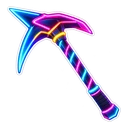
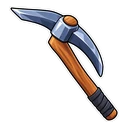
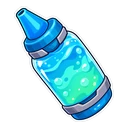
Six fan-made Fortnite cursor packs for Chrome, led by Peely, Jonesy and Fishstick. Fortnite Peely grins and swaps to a bottle of Slurp Juice. Fortnite Jonesy wears his default outfit and brings the Default Pickaxe. Fortnite Fishstick turns into a Chug Jug, and Fortnite Supply Llama pays out a V-Bucks coin. Two packs change the mood: Fortnite Neon Raven is drawn like a purple neon sign with a neon pickaxe on hover, and Fortnite Winterfest wraps Peely in a scarf beside a wrapped present.
Slurp Juice, Chug Jug, pickaxe: the loot behind each hover
The hover images are things you pick up or swing in a match. Slurp Juice and the Chug Jug are healing items, so Peely and Fishstick both top you up when you reach a link. Jonesy carries the Default Pickaxe, the harvesting tool every account starts with, which fits the face of the starter skins. The Supply Llama is the loot pinata everyone runs towards, and its V-Bucks coin completes the one pack in the set with no character face at all.
Fortnite cursor picks for dark mode and for December
Fortnite Neon Raven is the one made for dark pages. It is drawn with a soft outer glow, which shows properly on a dark background and looks paler on white. Fishstick's orange and Peely's yellow carry on both light and dark sites, so either works if you switch themes during the day. Fortnite Winterfest is the regular Peely in a scarf, named after the game's holiday event. Put it on when the event starts and go back to plain Peely in January.
Which Fortnite pack to pick
Fortnite Peely is the dependable everyday pick: bright yellow is easy to find on almost any page. Fortnite Fishstick is nearly as flexible in orange. Fortnite Jonesy is for anyone proud to drop in as a default. Fortnite Supply Llama suits players who care more about loot than skins. Keep Fortnite Neon Raven for dark mode, and switch to Fortnite Winterfest in December.
All 6 Fortnite packs
Each pack is a matched pair: one image for your normal pointer and one that takes over when you hover a link or button.
- Fortnite Fishstick and Chug Jug Cursor: Fishstick for the pointer, a Chug Jug on hover.
- Fortnite Neon Raven and Neon Pickaxe Cursor: Raven glowing neon purple for the pointer, a neon pickaxe on hover.
- Fortnite Winterfest and Wrapped Winterfest Present Cursor: Peely in a Winterfest scarf for the pointer, a wrapped Winterfest present on hover.
- Fortnite Jonesy and Default Pickaxe Cursor: chibi Jonesy in his default outfit for the pointer, the Default Pickaxe on hover.
- Fortnite Peely and Bottle of Slurp Juice Cursor: Peely the banana with a big grin for the pointer, a bottle of Slurp Juice on hover.
- Fortnite Supply Llama and V-Bucks Coin Cursor: the purple Supply Llama for the pointer, a V-Bucks coin on hover.
How to add a Fortnite cursor to Chrome
Add Cursor Customiser, the free custom cursor extension, from the Chrome Web Store, then press “Use this pack” on any pack above. It applies straight away.
Related guide: Custom cursors in Opera GX. You can also add a cursor trail or make your own pair.
Where Fortnite cursors work
The packs apply to web pages in Chrome: fortnite.com, the Epic Games Store site, Fortnite Tracker, fortnite.gg item shop pages, patch notes and YouTube. They do not appear in a match, in the lobby or in the Epic Games Launcher, and they do nothing on PlayStation, Xbox or Switch. Those all run outside the browser.
Frequently asked questions
Can I use these cursors in a Fortnite match?
No. Fortnite and the Epic Games Launcher run outside the browser, so the extension cannot reach them. The cursors show on websites you open in Chrome, including fortnite.com and stats trackers.
Are these Fortnite cosmetics, and do they need V-Bucks?
No. They are fan-made cursor images, not in-game items. They cost nothing, they are not added to your locker, and they are not linked to your Epic account in any way.
Is there a Peely cursor?
Yes, two. Fortnite Peely is the grinning banana with a bottle of Slurp Juice on hover. Fortnite Winterfest is Peely in a scarf with a wrapped present on hover, meant for December.
Are these official Fortnite cursors?
No. They are fan-made and unofficial. Cursor Customiser is not affiliated with or endorsed by Epic Games. They are free, with no ads inside the extension and no account.
Fan-made and unofficial. Cursor Customiser is not affiliated with, endorsed by or sponsored by Epic Games. All names and characters belong to their respective owners. Rights holder with a concern? See copyright and takedown requests.