Cuphead Cursors
This fan-made Cuphead cursor set for Chrome has four packs: the three playable heroes and one villain.
4 Cuphead cursor packs
All Gaming cursors





Hover a card to preview the cursor, then press “Use this pack” to add it.
About the Cuphead cursor collection
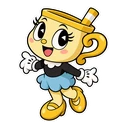
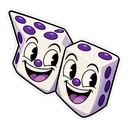
This fan-made Cuphead cursor set for Chrome has four packs: the three playable heroes and one villain. Cuphead comes with his straw and a finger-gun peashooter on hover. Mugman, in blue, gets a pink parry star. Ms. Chalice is paired with the Astral Cookie. King Dice has a sly grin and a pair of dice. They are drawn as chibi stickers, so expect a rounder, cuter take than the game's hand-inked 1930s style, not a copy of it.
What each hover pointer means in the game
The finger-gun is how Cuphead and Mugman shoot, and the peashooter is the first weapon you own, so that pointer was pointing before anyone drew it as a cursor. Mugman's star is pink because pink marks anything you can parry, the slap-jump that fills your super meter. Ms. Chalice's Astral Cookie is the charm that lets her take a brother's place in The Delicious Last Course. King Dice's dice are his whole act: he runs the Devil's casino.
Choosing a Cuphead cursor: brothers, Chalice or the villain
Cuphead and Mugman are near twins, told apart in the game by colour: red for Cuphead, blue for Mugman. Co-op players may have a side already. Ms. Chalice suits anyone who came to the game through the expansion, where she plays differently, with a double jump and a dash parry. King Dice is for players who prefer the bosses, and his fight is one of the last walls before the Devil. One hero pack per player makes sense on a shared computer.
Which Cuphead pack to pick
The Cuphead pack is the starting point, and its finger-gun is the most natural hover pointer in the set because it already points. Mugman is for the player-two crowd. Both brothers have a big round head, which helps when the cursor is small. Ms. Chalice may need a size up to show her detail. King Dice suits fans of the villains, and the dice are an easy shape to spot over links.
All 4 Cuphead packs
Each pack is a matched pair: one image for your normal pointer and one that takes over when you hover a link or button.
- Mugman and Pink Parry Star Cursor: chibi Mugman in blue for the pointer, a pink parry star on hover.
- Cuphead and Peashooter Cursor: chibi Cuphead with his straw for the pointer, a finger-gun peashooter on hover.
- Ms. Chalice and Astral Cookie Cursor: chibi Ms. Chalice for the pointer, an Astral Cookie on hover.
- King Dice and Pair of Dice Cursor: King Dice with a sly grin for the pointer, a pair of dice on hover.
How to add a Cuphead cursor to Chrome
Add Cursor Customiser, the free custom cursor extension, from the Chrome Web Store, then press “Use this pack” on any pack above. It applies straight away.
Related guide: How to change your cursor in Chrome. You can also add a cursor trail or make your own pair.
Where Cuphead cursors work
The packs show in Chrome on the Studio MDHR site, boss guides, the Cuphead wiki, speedrun.com leaderboards and video sites. They do not show inside Cuphead on Steam or GOG, or on Switch, Xbox or PlayStation. The game draws its own screen, and a browser extension plays no part in it.
Frequently asked questions
Are the Cuphead cursors drawn in the game's rubber-hose style?
No. They are fan-made chibi stickers, a rounder and cuter style. The game's hand-drawn 1930s animation is Studio MDHR's own work and is not reproduced here.
Why is Ms. Chalice's hover pointer a cookie?
In The Delicious Last Course, the game's expansion, equipping the Astral Cookie charm is what lets you play as Ms. Chalice. The fan-made pack uses the cookie as her hover item for that reason.
Is there a Devil or boss cursor besides King Dice?
Not at present. King Dice is the only villain in the set, alongside Cuphead, Mugman and Ms. Chalice. For the Devil, Cagney Carnation or another boss, you can upload your own image in the builder.
Are these official Cuphead cursors?
No. They are fan-made and unofficial. Cursor Customiser is not affiliated with or endorsed by Studio MDHR. They are free, with no ads inside the extension and no account.
Fan-made and unofficial. Cursor Customiser is not affiliated with, endorsed by or sponsored by Studio MDHR. All names and characters belong to their respective owners. Rights holder with a concern? See copyright and takedown requests.