Minecraft Cursors
Eight fan-made Minecraft cursor packs for Chrome, covering mobs, loot and two pixel blocks.
8 Minecraft cursor packs
All Gaming cursors









Hover a card to preview the cursor, then press “Use this pack” to add it.
About the Minecraft cursor collection
Eight fan-made Minecraft cursor packs for Chrome, covering mobs, loot and two pixel blocks. Minecraft Creeper frowns and swaps to a block of TNT. Minecraft Steve carries a diamond pickaxe, Minecraft Enderman holds a grass block and leaves an Ender Pearl, and Minecraft Diamond Sword turns into a raw diamond. Minecraft Axolotl is pink and comes with its bucket. Enchanted Gold Cursor and Fire Coral Block are pixel art, each paired with a blocky pointing hand. Minecraft Christmas puts the Creeper in a Santa hat, with TNT wrapped like a present.
What each Minecraft cursor turns into on hover
Each hover image is the thing you would expect to find next to the character. The Creeper gets TNT, since both end the same way. Steve gets the diamond pickaxe, the tool you need before you can mine obsidian. The Enderman holds a grass block, as they do when they wander off with pieces of your world, and its hover is an Ender Pearl. The Axolotl becomes a Bucket of Axolotl, the item you use to carry one home. The sword pack simply shows a raw diamond.
Rounded stickers and true pixel blocks
Most of this set is drawn as rounded chibi stickers with a white border, not in blocks, so the Creeper and Steve look softer than they do in the game. If you want square pixels, two packs keep them: Enchanted Gold Cursor shows the enchanted golden apple, and Fire Coral Block shows a single coral block in red-orange tones. Both use a pixel hand for the hover state in place of an item. On dark-mode sites, skip the Enderman, which is mostly black, and reach for the green Creeper.
Which Minecraft pack to pick
Minecraft Creeper is the easy first choice: green stands out on most websites, light or dark. Minecraft Diamond Sword is long and pointed, so it behaves like a standard arrow when you click small targets. Minecraft Enderman is clearest on white and pale pages. Minecraft Axolotl is the softest of the set. Choose Fire Coral Block or Enchanted Gold Cursor for pixel art, Minecraft Steve for the original character, and Minecraft Christmas in December.
All 8 Minecraft packs
Each pack is a matched pair: one image for your normal pointer and one that takes over when you hover a link or button.
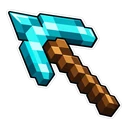
- Minecraft Steve and Diamond Pickaxe Cursor: chibi Steve in his teal shirt for the pointer, a diamond pickaxe on hover.
- Minecraft Enderman and Ender Pearl Cursor: a chibi Enderman holding a grass block for the pointer, an Ender Pearl on hover.
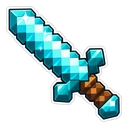
- Minecraft Diamond Sword and Raw Diamond Cursor: a shining diamond sword for the pointer, a raw diamond on hover.
- Minecraft Axolotl and Bucket of Axolotl Cursor: a blushing pink axolotl for the pointer, a Bucket of Axolotl on hover.
- Minecraft Creeper and Block of TNT Cursor: a chibi Creeper with its classic frown for the pointer, a block of TNT on hover.
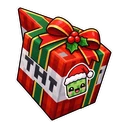
- Minecraft Christmas and Wrapped TNT Cursor: a Creeper in a Santa hat for the pointer, TNT wrapped like a present on hover.
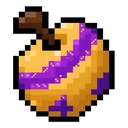
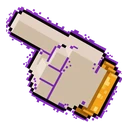
- Enchanted Gold Cursor: a pixel art golden apple with a purple enchantment band for the pointer, a blocky beige hand with a gold cuff on hover.
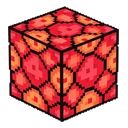
- Fire Coral Block Cursor: a red and orange pixel art coral block for the pointer, a blocky pixel hand with a blue cuff on hover.
How to add a Minecraft cursor to Chrome
Add Cursor Customiser, the free custom cursor extension, from the Chrome Web Store, then press “Use this pack” on any pack above. It applies straight away.
Related guide: Custom cursors on a Chromebook. You can also add a cursor trail or make your own pair.
Where Minecraft cursors work
Your pointer changes on websites in Chrome: minecraft.net, the Minecraft Wiki, Chunkbase seed maps, skin editors, Modrinth and CurseForge mod pages and server lists. It does not change inside Minecraft itself, in Java or Bedrock Edition, on console or mobile, or in the Minecraft Launcher. Those run outside the browser.
Frequently asked questions
Do Minecraft cursors show up inside the game?
No. Minecraft Java and Bedrock are separate programs with their own menu pointer, and the extension cannot reach them. These packs change the pointer on web pages in Chrome, such as the wiki, a seed map or a skin editor.
Is this a Minecraft mod or resource pack?
No. Nothing is added to your game folder and no game files are changed. It is a Chrome extension, so it only affects the pointer in your browser and can be switched off at any time.
Is there a pixel art Minecraft cursor?
Yes, two. Enchanted Gold Cursor shows the enchanted golden apple and Fire Coral Block shows a fire coral block, both in pixel art with a blocky pointing hand on hover. The other six packs are rounded chibi stickers.
Are these official Minecraft cursors?
No. They are fan-made and unofficial. Cursor Customiser is not affiliated with or endorsed by Mojang Studios. They are free, with no ads inside the extension and no account.
Fan-made and unofficial. Cursor Customiser is not affiliated with, endorsed by or sponsored by Mojang Studios. All names and characters belong to their respective owners. Rights holder with a concern? See copyright and takedown requests.