Minimal Cursors
A small set of minimalist cursor packs: one simple object or shape each, with smooth colour and little detail. All are the site's own designs, each with a hover pointer.
12 Minimal cursor packs
Search all packs




















Hover a card to preview the cursor, then press “Use this pack” to add it.
About the Minimal cursor collection
The Minimal collection is a small set, and none of it is fan-made. Each pack is a single object with a clean outline. The quietest are Pearl Mist Pebble, a pearlescent pebble in soft pastel grey, and Steel Sheen Sprite, a rounded shape in cool steel-blue gradients. Feather Shuttlecock is a clean feathered shuttlecock with a light-grey gloved hand on hover. Colour comes from Scarlet Floppy Hat, Glossy Magenta Comb, Blush Egglet and Peach Pixel Buddy. Victory Finish Flag, Midnight Stretch Kitten, Twist Star Arrow and Invisible Blue Pixel are here too. Be aware that these are small objects and characters, several with a smile. A bare dot, ring or thin arrow is not among them.
Minimal with a face: what this set is and is not
Search for a minimalist cursor and you may expect a dot, a ring or a hairline arrow. This collection takes a different line: simple objects with smooth gradients and very little detail, most of them with a small face or arm. Pearl Mist Pebble extends a tiny nub to point. Glossy Magenta Comb raises a little arm. Scarlet Floppy Hat shows a glove-like finger from under the brim. If you want a pointer with no personality at all, the builder on the site accepts your own image, so a plain dot can be uploaded instead.
Grey, steel and one clean feather: the quiet end
Three packs keep colour low. Pearl Mist Pebble is soft pastel grey with a pearl finish. Steel Sheen Sprite uses cool steel-blue with metallic highlights. Feather Shuttlecock pairs its shuttlecock with a light-grey glove. They draw less attention in a spreadsheet or a long article than a bright character would. Pale grey has a cost, though: on a white page it has less contrast than a dark pointer. Raise the size a step, or choose Midnight Stretch Kitten, an inky kitten with a bold sticker outline, for light sites.
Which Minimal pack to pick
For documents and email, Pearl Mist Pebble or Steel Sheen Sprite stay out of the way. On white pages all day, Midnight Stretch Kitten gives more contrast. For one spot of colour on a plain setup, Scarlet Floppy Hat is red and Glossy Magenta Comb is magenta. Sport fans have Feather Shuttlecock and Victory Finish Flag. Twist Star Arrow has an arrow tail, the closest thing here to a traditional pointer shape. Invisible Blue Pixel and Peach Pixel Buddy are the two blocky pixel designs.
All 12 Minimal packs
Each pack is a matched pair: one image for your normal pointer and one that takes over when you hover a link or button.
- Feather Shuttlecock Cursor: a grey badminton shuttlecock with a white tip for the pointer, a blue-grey gloved hand pointing up-left on hover.
- Midnight Stretch Kitten Cursor: a glossy black kitten crouching in a stretch for the pointer, a black and white kitten raising a paw on hover.
- Twist Star Arrow Cursor: a glossy pink star with a curling purple arrow tail for the pointer, the same star with a purple hand pointing on hover.
- Peach Pixel Buddy Cursor: a smiling pink and yellow pixel art peach for the pointer, the same pixel peach stretching a small arm on hover.
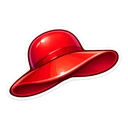
- Scarlet Floppy Hat Cursor: a glossy red floppy sun hat for the pointer, the red hat with a white gloved pointing hand on hover.
- Pearl Mist Pebble Cursor: a glossy pale grey pebble with a gentle smile for the pointer, the same grey pebble pointing with a small nub on hover.
- Glossy Magenta Comb Cursor: a smiling glossy magenta comb for the pointer, the magenta comb raising an arm to point on hover.
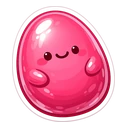
- Blush Egglet Cursor: a glossy rosy pink egg with a small smile for the pointer, the same pink egg raising a pointing arm on hover.
- Steel Sheen Sprite Cursor: a glossy steel blue blob with a small smile for the pointer, the same steel blue blob raising a pointing arm on hover.
- Victory Finish Flag Cursor: a chequered flag on a gold pole for the pointer, the chequered flag with a white gloved pointing hand on hover.
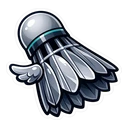
- Minimal Shuttlecock Cursor: a grey shuttlecock with a small white wing for the pointer, the shuttlecock with a white pointing hand on hover.
- Invisible Blue Pixel Cursor: a smiling bright blue pixel square for the pointer, the blue pixel square pointing a small finger on hover.
How to add a Minimal cursor to Chrome
Add Cursor Customiser, the free custom cursor extension, from the Chrome Web Store, then press “Use this pack” on any pack above. It applies straight away.
Related guide: Custom cursors on Windows 11. You can also add a cursor trail or make your own pair.
Where Minimal cursors work
Minimalist cursors fit the pages where you want fewer distractions: Notion, Google Docs and Sheets, Gmail, Figma in the browser, Trello and long reads, in Chrome, Edge, Brave or Opera GX. They do not replace the pointer in desktop Word or Excel, in the Figma or Notion apps, on chrome:// pages, in the Chrome Web Store or on the desktop.
Frequently asked questions
Is there a plain dot or circle cursor for Chrome?
Not in this collection. Every pack here is a simple object or character, not a bare shape. For a dot, ring or thin arrow, upload your own image to the builder on the site, save it as a pair, then set the size with the slider in the extension popup.
Which minimal cursor is least distracting for work?
Pearl Mist Pebble and Steel Sheen Sprite are the calmest: one rounded shape each, in grey and steel-blue. Feather Shuttlecock is similar in tone. Keep the size low in the extension popup and leave trails and click effects switched off.
Do minimalist cursors still work at a small size?
Yes. The size slider in the extension popup applies to every pack, and single shapes such as Blush Egglet or Pearl Mist Pebble lose less when small than busy character art does. Midnight Stretch Kitten has a bold outline drawn to stay readable at tiny sizes.
Does a minimal cursor change my Windows or Mac pointer too?
No. The extension changes the cursor on web pages inside Chrome and other Chromium browsers only. Your system pointer stays as it is on the desktop and in other apps. To change that one, use the mouse pointer settings in Windows or macOS.